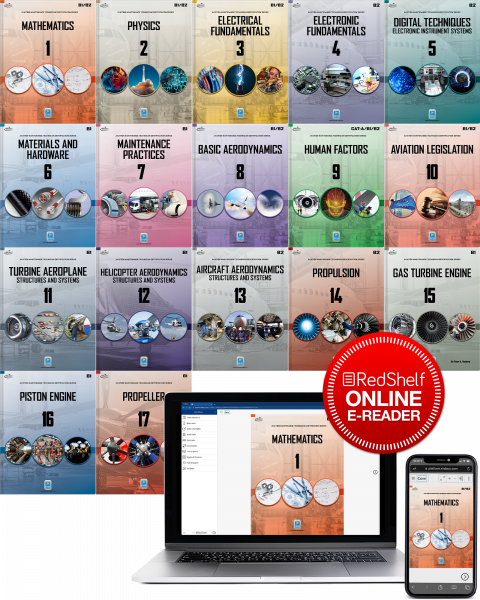
This set of 17 provides the complete library of EASA Part 66 B1 and B2 modules covering all content for B1.1, 1.3, 1.4, and B2 subjects.* Within this set, those modules which have multiple versions (M-4, -5, -6, and -7) are provided in their more advanced editions.
(M11 is the turbine aeroplane version. M11 for piston aeroplanes is not currently produced)
This set includes:
- B1/2 Module 1 - Mathematics
- B1/2 Module 2 - Physics
- B1/2 Module 3 - Electrical Fundamentals
- B2 Module 4 - Electrical Fundamentals
- B2 Module 5 - Digital Techniques
- B1 Module 6 - Materials and Hardware
- B1 Module 7 - Maintenance Practices
- B1/2 Module 8 - Basic Aerodynamics
- B1/2 Module 9 - Human Factors
- B1/2 Module 10 - Aviation Legislation
- B1 Module 11 - Turbine Aeroplane Aerodynamics, Structures and Systems
- B2 Module 12 - Helicopter Aerodynamics, Structures and Systems
- B2 Module 13 - Aircraft (Avionics) Aerodynamics, Structures and Systems
- B2 Module 14 - Propulsion
- B1 Module 15 - Turbine Engine
- B1 Module 16 - Piston Engine
- B1 Module 17 - Propeller
(M11 is the turbine aeroplane version. M11 for piston aeroplanes is not currently produced)
Each module is written strictly in accordance with EASA Part 66 requirements and learning levels and is fully updated to EASA 2023-989.
Each topic is explained with understandable text and exceptional full color illustrations in a step by step detail. You will learn by understanding concepts, not just rote memorization and you will learn how and why each skill is useful in the day to day tasks of the aircraft technician in the aviation maintenance environment.
To Instructors:
For schools using ATB modules for your primary student notes, we offer various additional services including projectable image banks, examination question databases, and generous additional support for instructors and your requirements for competent authorities.
If a unique set is required for your program, apart from these listed common sets, please write to orders@actechbooks.com or call 1-970 726-5111
About Our Online eBooks
We have partnerned with Redshelf to bring you the most powerful Online eBook experience available on the internet today. The online eReader is a cloud-based streaming platform that creates an accessible, engaging, and interactive reading experience. The online eReader platform is accessible anywhere with an internet connection and a modern web browser.
When your order is completed, the eBook is ready for you. Find it located in your "MyShelf" dashboard at Redshelf
The newly enhanced MyShelf provides a centralized space to view, acquire, and access all your Online eBooks available through RedShelf. Updated, easy-to-understand features provide the ability to begin reading your eBooks, and seamlessly access your eBook(s)–all from a single login location.
Online eBook Features
This platform includes extra features with each eBook to enhance your study habits:
- Highlighting
- Notes
- Study Guide
- Flashcards Creation
- Collaboration
- Text-to-Speech


Get The Mobile App
The RedShelf eReader companion app provides simple online or offline access to read and engage with your eBooks located in your RedShelf account. Learn more about these apps HERE
Download from Apple Store
From your Apple device, go to the App Store. Go to the search and type in RedShelf. Select “Get” and complete the prompts to begin the download.
Download from Google Play Store
From your Android device, to to the Google Play Store. Go to the search and type in RedShelf. Select “Install” to begin the download.
Pro Tip: Make sure you are on the most recent version of your operating system as well as the most current version of the app. Most users have their app settings update automatically, but this can be confirmed by going to your Settings.
Explore Our Online eBook Catalog Below